A few downloads here, some photos there, old projects, backups, installers, documents, videos, and before long your drive is filling up and you're trying to work out what's safe to remove.
The problem is rarely one huge file. More often, it's years of accumulated data spread across hundreds of folders.
When that happens, most people start looking for a disk cleaner.
I did too.
The problem with many storage tools
Over the years I've tried various storage and cleaning tools. Some were useful, but many seemed focused on one thing: deleting files as quickly as possible.
That approach never really sat comfortably with me.
Files are personal. They might be family photos, work documents, archived projects, downloaded software, or things you've forgotten about but still need.
Unfortunately, I learned that lesson the hard way.
At one point I lost photos after using a storage management tool. It wasn't a disaster, but it was enough to make me realise that blindly deleting files based on a recommendation from software wasn't something I was comfortable with.
After that, I became much more cautious.
A different approach
Instead of trying to delete everything, I started organising my storage differently.
Older photos, archived files, and duplicate content were moved from my SSD onto a larger HDD. I also used online backup software so those files remained protected while freeing up valuable space on my primary drive and reducing the amount of storage I needed in OneDrive.
The result was surprisingly effective.
The files that were genuinely rubbish got deleted.
The files that still had value but didn't need to be in my everyday folders were archived elsewhere.
Suddenly everything became easier to manage.
My active folders were cleaner, my cloud storage requirements were lower, and I still had access to years of photos and files whenever I needed them.
That experience shaped how I thought about storage management.
I realised that the real challenge isn't deleting files.
The real challenge is understanding what you have.
Storage management shouldn't feel risky
That idea became the foundation of Zenovix Storage Manager.
I didn't want to build another one-click clean utility that automatically removes files and hopes for the best.
Instead, I wanted a tool that helps people understand their storage so they can make informed decisions for themselves.
Sometimes that decision will be to delete a file.
Sometimes it will be to move it somewhere else.
Sometimes it will be to keep it exactly where it is.
The important thing is that the user stays in control.
More than a file list
Another thing I noticed was that most tools gave me lists.
Lots and lots of lists.
When you're dealing with thousands, or sometimes millions, of files, scrolling through a giant list quickly becomes overwhelming.
I wanted something more visual.
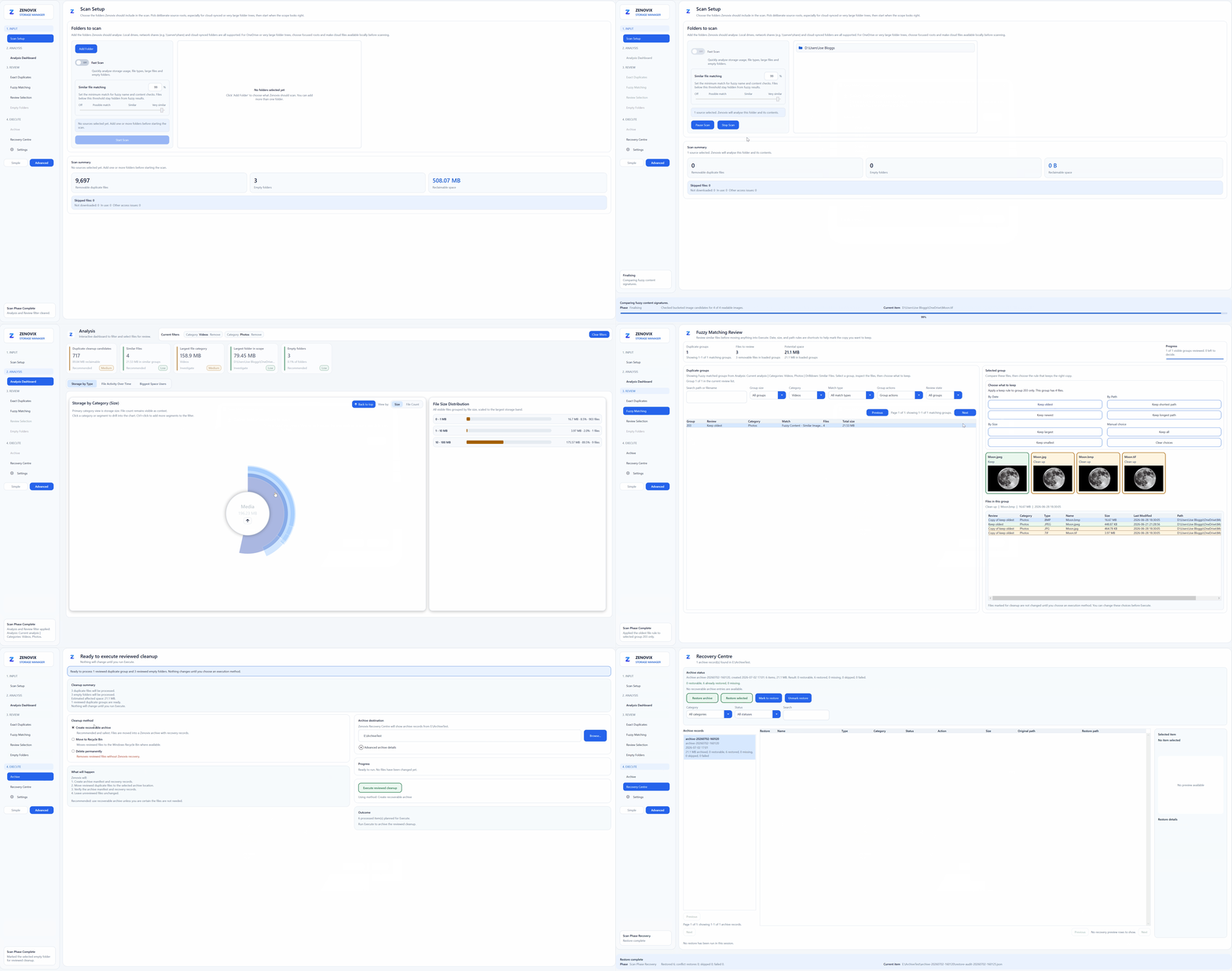
Zenovix Storage Manager uses dashboards and visualisations to help users understand what's happening on their drives.
The goal isn't simply to show data. The goal is to make that data useful.
Filters applied in the dashboard flow through the rest of the application, allowing users to narrow down results and focus on specific areas of interest.
Rather than trying to solve everything in one session, users can progressively work through their storage and investigate what matters most.
Built for real-world storage volumes
One of the things that frustrates me about many storage tools is the assumption that users will complete everything in one sitting.
That's not realistic when you're dealing with hundreds of gigabytes or even terabytes of data.
I wanted Zenovix Storage Manager to support a more practical workflow.
You can scan your storage, review the results, save your progress, and return later.
That means you can gradually work through large datasets without starting from scratch every time.
For many users, especially photographers, collectors, content creators, and long-term Windows users, that makes the process far more manageable.
Finding duplicates properly
Duplicate detection was another area where I wanted accuracy rather than shortcuts.
File names can be misleading.
Two files can have different names but contain exactly the same content. Equally, two files with similar names may be completely different.
Zenovix Storage Manager uses SHA-256 hashing to identify genuine duplicate content based on the data inside the files.
That provides a much higher level of confidence than simply comparing names or file sizes.
Again, the purpose isn't automatic deletion.
The purpose is understanding.
Why Windows?
The simple answer is that Windows is what I know.
I've used Windows for decades, both professionally and personally.
Like many users, I've accumulated years of photos, documents, downloads, backups, software installers, and project files. I've experienced the same frustrations that many people face when their drives start filling up.
When I decided to build a storage management application, Windows was the natural place to start because it's the platform I understand best.
In many ways, Zenovix Storage Manager started as a solution to a problem I wanted solved for myself.
As the project developed, I realised that plenty of other people were facing exactly the same challenges.
Building trust rather than urgency
One thing I deliberately avoided was using scare tactics.
Some software tries to convince users that their computers are full of critical problems that need immediate attention.
I don't believe that's helpful.
Storage management should feel calm, controlled, and transparent.
People should be able to explore their files, understand their storage usage, identify duplicates, and decide what action they want to take.
No pressure.
No exaggerated warnings.
No automatic decisions made behind the scenes.
Just information, insight, and control.
Looking ahead
Zenovix Storage Manager exists because I believe people deserve a better understanding of their own data.
For me, storage management isn't about deleting as much as possible.
It's about understanding what you have, deciding what matters, archiving what you want to keep, removing what you don't need, and staying in control throughout the process.
That's the approach that helped me manage my own files more effectively.
And that's the approach I wanted to bring to Zenovix Storage Manager.
Learn more
Explore Zenovix Storage Manager
See how Zenovix helps Windows users analyse disk usage, find large files, review duplicate candidates and clean up storage carefully.