There are already some very good Windows tools for understanding and cleaning up disk space.
CCleaner, TreeSize, WinDirStat and WizTree are all well known for a reason. They have helped a lot of people find large files, clean up clutter, understand disk usage or get a clearer view of what is taking up space.
So this is not a "these tools are bad and Zenovix is better" article.
That would not be fair, and it would not be honest.
Zenovix Storage Manager was built for a slightly different problem. It is for people who do not just want to see what is taking up space. It is for people who want a guided way to review files, work through them gradually, and decide what should be archived, deleted or kept.
For me, that distinction matters.
Seeing the problem is useful. Deciding what to safely do about it is often the harder part.
Where the existing tools are strong
Different storage tools do different jobs well.
CCleaner is probably the best known general PC cleanup tool. It is useful for clearing temporary files, browser clutter and other common system leftovers. It also includes duplicate file finding, which can help when the same files have built up in several places.
TreeSize is a strong disk space analyser. It is useful when you want to understand how storage is being used across drives, folders and files. It is more detailed than many simple cleanup tools and is especially useful when you want a clearer breakdown of where storage has gone.
WinDirStat is a familiar option for visual disk usage analysis. Its treemap view makes it easier to spot large areas of storage quickly, especially when you are trying to understand why a drive has filled up.
WizTree is known for speed. If your main aim is to quickly find the largest files and folders on a Windows machine, it is a very capable tool.
Windows Storage Sense also deserves a mention because it is already built into Windows. For many people, it may be enough for clearing common storage categories such as temporary files and recycle bin content.
All of those tools have their place.
Zenovix is not trying to pretend they do not.
Why I wanted something different
The problem I kept running into was not just finding large files.
It was deciding what to do next.
A disk usage tool can show that a folder is huge. A duplicate finder can show that two files look the same. A cleanup tool can remove obvious system clutter.
But with personal files, old projects, downloaded installers, photos, videos, cloud sync folders and backups, the decision is not always obvious.
Sometimes you can delete something straight away.
Sometimes you want to archive it first.
Sometimes you need to compare files before deciding.
Sometimes you want to come back to the job later rather than sorting everything in one go.
That is the gap Zenovix is aimed at.
It is not just about finding files. It is about helping you work through them in a more controlled way.
The main difference: review before action
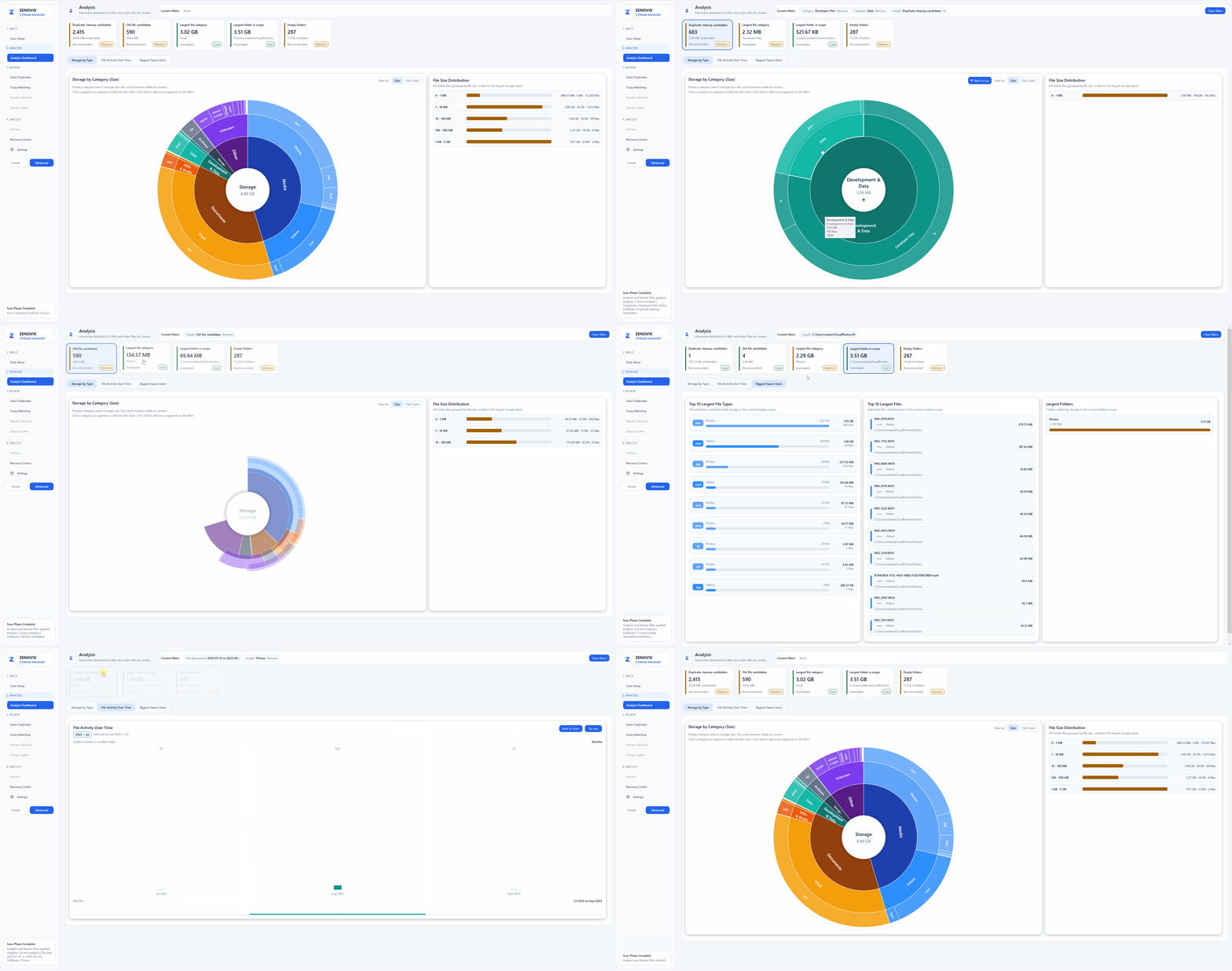
Zenovix is built around a review first workflow.
The idea is simple:
Scan your storage, look at the results, filter them, review the files, then decide whether to archive, delete or keep them.
That sounds basic, but it changes the feel of the process.
Instead of rushing into a big cleanup, Zenovix is designed to help you work through storage gradually. You can use the dashboard to understand what is there, use filters to narrow things down, review groups of files, and make decisions in stages.
That was important to me because large storage cleanup jobs are rarely finished in one sitting.
If you have years of files, photos, downloads and backups, trying to deal with everything at once can be a bit much. It is easy to get tired, make a mistake or just give up halfway through.
Zenovix is meant to make that process feel more manageable.
Archive or delete
One thing I wanted Zenovix to handle properly was the difference between archiving and deleting.
Deleting has its place. If something is clearly junk, you may simply want it gone.
But not every storage decision should be permanent straight away.
Sometimes you want to move files out of the way, free up space, and still have a safer route back if you later realise you needed something. That is where archiving is useful.
Zenovix supports both archive and delete workflows because real storage cleanup is not always black and white.
To be clear, this does not mean every deleted file can always be recovered. No responsible storage tool should suggest that. But Zenovix is designed to encourage safer decisions before deletion happens.
Duplicate and similar files
Duplicate files are another common problem.
They can build up from downloads, phone imports, cloud sync, backups, copied folders and exported media. Over time, you can end up with several versions of the same file without really knowing which one matters.
Some duplicate tools are good at finding matches. That is useful.
With Zenovix, the aim is to make duplicate and similar file review part of the wider cleanup workflow. Finding the duplicate is only part of the job. You still need to decide which version to keep, whether one should be archived, and whether the location or quality of the file matters.
For example, I might not want to keep the smallest copy of a photo just because it is a duplicate. I may want the higher quality version, or the one stored in the right folder.
That is why review matters.
A simple way to think about the difference
Here is the fairest way I would compare them.
| Tool | What it is especially useful for | How Zenovix is different |
|---|---|---|
| CCleaner | General PC cleanup, temporary files and duplicate finding | Zenovix is more focused on reviewing personal files and deciding whether to archive, delete or keep them |
| TreeSize | Detailed disk space analysis and folder size visibility | Zenovix focuses more on the cleanup workflow after analysis |
| WinDirStat | Visualising disk usage with a treemap | Zenovix focuses less on visual mapping and more on guided review and action |
| WizTree | Quickly finding large files and folders | Zenovix is less about raw scan speed and more about controlled decision making |
| Windows Storage Sense | Built in cleanup for common Windows storage categories | Zenovix is for more detailed file review, duplicates, archives and staged cleanup |
None of this means one tool is automatically better than another.
It depends what problem you are trying to solve.
When Zenovix may not be the right tool
If you just want to clear temporary files, browser cache or common Windows clutter, a general cleaner may be enough.
If you want a very fast view of your biggest files, WizTree may be the better fit.
If you want a visual treemap, WinDirStat may be exactly what you need.
If you need detailed disk usage reporting, TreeSize may suit that better.
If you only need basic Windows cleanup, Storage Sense may already do what you need.
Zenovix is for a different type of job.
It is for when you want to work through your own files with more context and decide what should be archived, deleted or kept.
Why this matters
I built Zenovix because I wanted a storage tool that matched the way I actually clean up files.
I do not always want to delete things immediately.
I do not always want to sort everything in one sitting.
I want to see useful insights, filter the results, review files properly, archive where it makes sense, delete when I am confident, and save progress as I go.
That is especially useful when dealing with large personal folders, photo collections, old downloads, project folders, OneDrive or iCloud sync folders, backups and years of accumulated files.
For me, the real question was never just:
What is taking up space?
It was:
What can I safely do with it?
That is the problem Zenovix is trying to solve.
A note on the product names mentioned
Product names mentioned in this article are used for fair comparison only.
CCleaner, TreeSize, WinDirStat, WizTree and Windows are separate products owned by their respective companies or projects. Zenovix is not affiliated with, endorsed by, or sponsored by any of them.
Conclusion
CCleaner, TreeSize, WinDirStat, WizTree and Windows Storage Sense are all useful tools. They each approach storage cleanup and disk analysis in different ways, and they have earned their place.
Zenovix is not trying to dismiss them.
It is simply aimed at people who want a more guided workflow after the scan: review files, filter results, archive where needed, delete when confident, and work through storage cleanup at a sensible pace.
You can learn more about that workflow on the Zenovix Storage Manager homepage.
If you are mainly choosing between the traditional analysers, see WizTree vs TreeSize vs WinDirStat: which Windows storage tool should you use?
If you mainly want to see what is using disk space, one of the traditional tools may be enough.
If you want to decide what to archive or delete without rushing, Zenovix was built for that.
Learn more
Review storage before cleanup decisions
See how Zenovix Storage Manager helps Windows users analyse disk usage, find duplicate files, archive old files and clean up storage with review before action.